
Billing, SCU, And Limits
Understand Security Compute Units, modality billing, included allowance, overage, tier caps, and file limits.
Citadel billing is based on SCU, short for Security Compute Units. SCU measures the amount of security compute used by a scan.
There is no public dollar rate. Starting October 1, 2026, Mighty will not offer direct purchase of the hosted SaaS plan. New commercial terms will be enterprise or custom, scoped on a call.
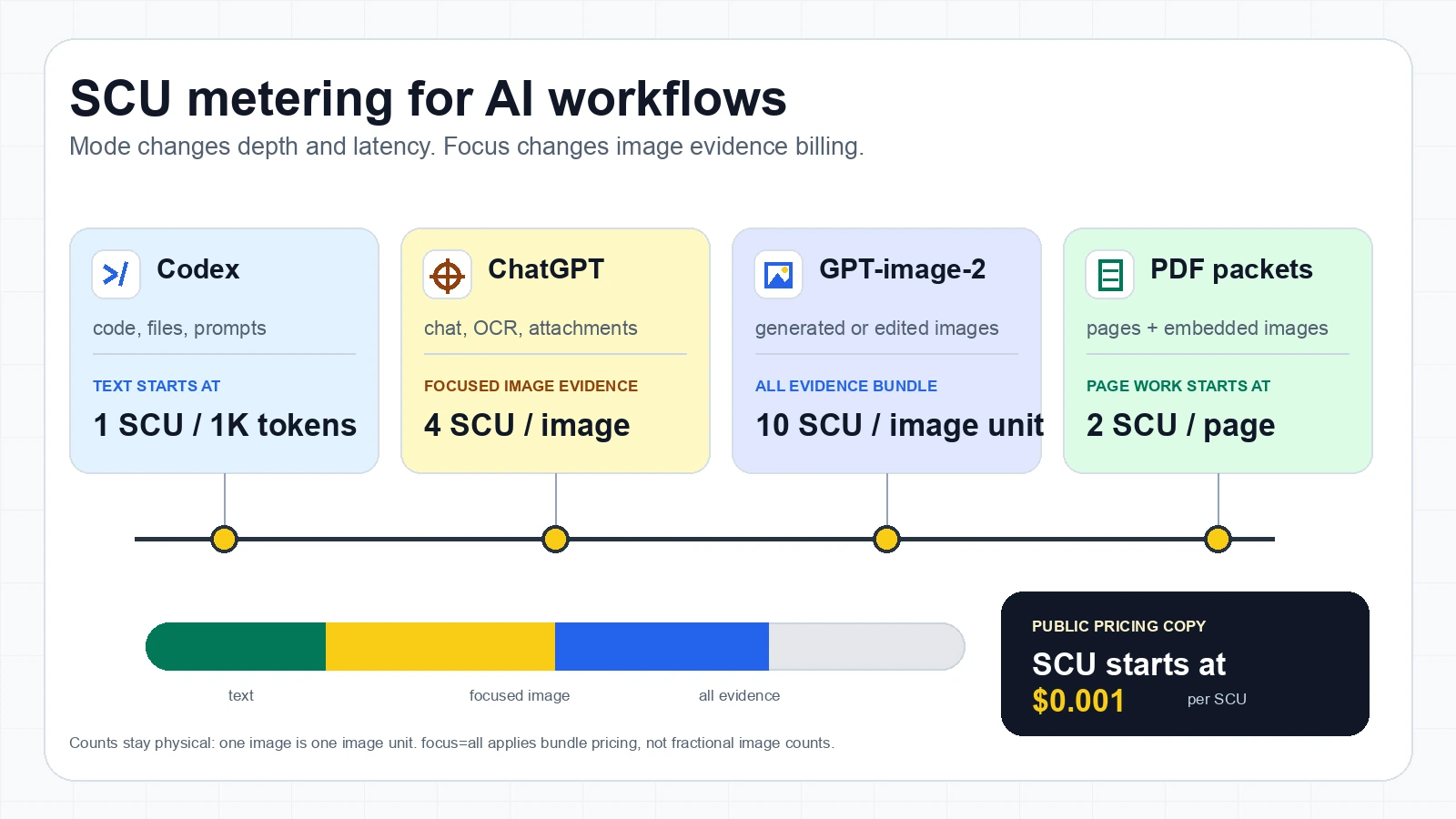
Text uses the least compute. Image and document work use more. Mode controls scan depth and latency. Focus controls the image evidence family and image-unit billing. One path is 4 SCU per image, two paths are 8 SCU per image unit, and all-evidence review (all three paths, or focus=all) bills 12 SCU per image unit (4 SCU × 3 paths).
For PDFs, page work and embedded image work are separate. They are added together. A PDF page with embedded images costs more than scanning plain extracted text, and embedded images use the active focus image-unit price.
Mode And Focus Pricing
| Setting | Billing rule |
|---|---|
| Dollar rate | Scoped on a call. There is no public price list. |
| Text | Starts at 1 SCU per 1,000 tokens, rounded up. |
focus=steg, focus=ai, focus=edits | One evidence path. Focused image evidence starts at 4 SCU per image. |
Two evidence paths (e.g. focus=steg,ai, focus=ai,edits, focus=steg,edits) | 8 SCU per image unit (4 SCU × 2 paths). |
focus=all | All three evidence paths together. All-evidence image review bills 12 SCU per image unit (4 SCU × 3 paths). |
focus=both | Deprecated alias for focus=all; bills 12 SCU per image unit. |
| PDFs | Start at 2 SCU per page, plus unique embedded image units at the active focus price. |
mode=fast, mode=secure, mode=comprehensive | Controls scan depth and latency only. There is no separate mode SCU multiplier. |
Counts stay physical. One image is one image unit. Two evidence paths bill 8 SCU per image unit; the full triple (focus=all) bills 12 SCU per image unit (4 SCU × 3 paths). Linear pricing does not turn the image count into a fractional value.
Mode controls depth; focus controls image evidence billing.
SCU By Modality
| Work processed | SCU |
|---|---|
| Text | 1 SCU per 1,000 tokens, rounded up. |
| Focused standalone image (one evidence path) | 4 SCU per image for focus=steg, focus=ai, or focus=edits. |
| Two-path standalone image | 8 SCU per image unit for two evidence paths (e.g. focus=steg,ai, focus=ai,edits). |
| All-evidence standalone image | 12 SCU per image unit for focus=all (all three paths) and deprecated focus=both. |
| PDF or document page | 2 SCU per page wrapper and text extraction. |
| Embedded image inside a PDF | 4, 8, or 12 SCU per unique embedded image, added on top of page SCU, using the active focus image-unit price. |
| Minimum processed request | 1 SCU when content is scanned. |
PDF embedded images are billed separately from page processing. They are deduplicated by hash before counting, so the same logo repeated on many pages should count once.
PDF SCU Formula
For PDFs, calculate focused scans like this:
Focused PDF SCU = pages * 2 + unique embedded images * 4For all-evidence review:
All-evidence PDF SCU = pages * 2 + unique embedded images * 12Examples:
| PDF shape | Focus | SCU |
|---|---|---|
| 1 page, no embedded images | any supported focus | 2 SCU |
| 1 page, 4 unique embedded images | focused | 18 SCU: 2 for the page plus 16 for images |
| 1 page, 4 unique embedded images | all evidence | 50 SCU: 2 for the page plus 48 for images |
| 1 page, the same image repeated 4 times | focused | 6 SCU: 2 for the page plus 4 for 1 unique image |
| 10 pages, same logo on every page | all evidence | 32 SCU: 20 for pages plus 12 for 1 unique image |
| 50 pages, 30 unique embedded images | focused | 220 SCU: 100 for pages plus 120 for images |
This matches the billing code: document pages and embedded image count are separate usage metrics, then the totals are added together.
Plain version: first count pages, then count unique embedded images, then add both numbers. A one-page focused PDF with four unique embedded images is 18 SCU, not 2 SCU and not 16 SCU. The same PDF with focus=all is 50 SCU.
What The Response Can Include
{
  "action": "WARN",
  "risk_score": 68,
  "scan_id": "4e7c5fc1-6947-492b-bd22-0589d6477c8b",
  "scan_group_id": "9b3e4f8d-96c9-4f42-8338-8cf9571c1c70",
  "scu_charged": 12
}
Logs and dashboard usage can also show allowance remaining and whether usage was included or overage.
Allowance And Overage
The billing page shows:
- Included SCU for the current period.
- SCU used this period.
- Overage SCU when usage passes the included allowance.
- Organization spending limit.
- Estimated total.
If billing or tier policy blocks a scan, handle 402. If payload size or file complexity blocks a scan, handle 413. If rate limits block a scan, handle 429.
Limits
Large files need clear product routing.
Current PDF tier ceilings:
| Tier | PDF pages per request | Embedded images per PDF |
|---|---|---|
| Free preview | 4 | 1 |
| Pro | 1,000 | 100 |
These are per-request ceilings for PDFs. They are separate from rate limits, billing allowance, and organization spending limits.
What Developers Should Do
- Show upload size and file type limits before upload.
- Use async scans for high-value images and large PDFs.
- Route
402to billing, upgrade, or admin action. - Route
413to reduce file size, split the PDF, or review manually. - Route
429to retry with backoff. - Log
scu_charged,scan_id,request_id, andscan_group_id.
Common Mistakes
- Thinking text and image scans cost the same. Image and document scans use more compute.
- Missing that two evidence paths bill 8 SCU per image unit, and that
focus=alland deprecatedfocus=bothbill 12 SCU per image unit. - Treating
402as a generic failure. It usually needs a billing or tier action. - Treating
413as only a file size issue. It can also represent a tier file cap. - Retrying
429immediately. Use backoff. - Running comprehensive async review on every low-risk text message.
For plain-language definitions of mode, focus, AI edits, steganography, and prompt injection, see the glossary.
Need commercial terms?
There is no public price list. Book a working session and we scope terms with you.
AI-Agent Prompt
Paste this into Cursor, Codex, Claude Code, or Windsurf.
Make this Citadel integration billing-aware and limit-aware.

Requirements:
- Log scu_charged when returned.
- Store scan_id, request_id, scan_group_id, session_id, action, and risk_score.
- Explain SCU in developer comments or admin UI as Security Compute Units.
- Handle 402 as billing, quota, tier cap, or spending limit action.
- Handle 413 as file size, PDF page cap, embedded image cap, or payload complexity.
- Handle 429 with retry backoff.
- Use async scans for high-value images and large PDFs.
- Do not run comprehensive mode on every low-risk text message.

Acceptance criteria:
- Tests cover successful scan with scu_charged.
- Tests cover 402, 413, and 429.
- Large file workflows can route to manual review or ask the user to split the file.
- Logs expose enough IDs for support and billing investigation.