
Modalities And Attacks
Understand what Citadel checks across text, images, documents, OCR output, model output, and closed beta audio.
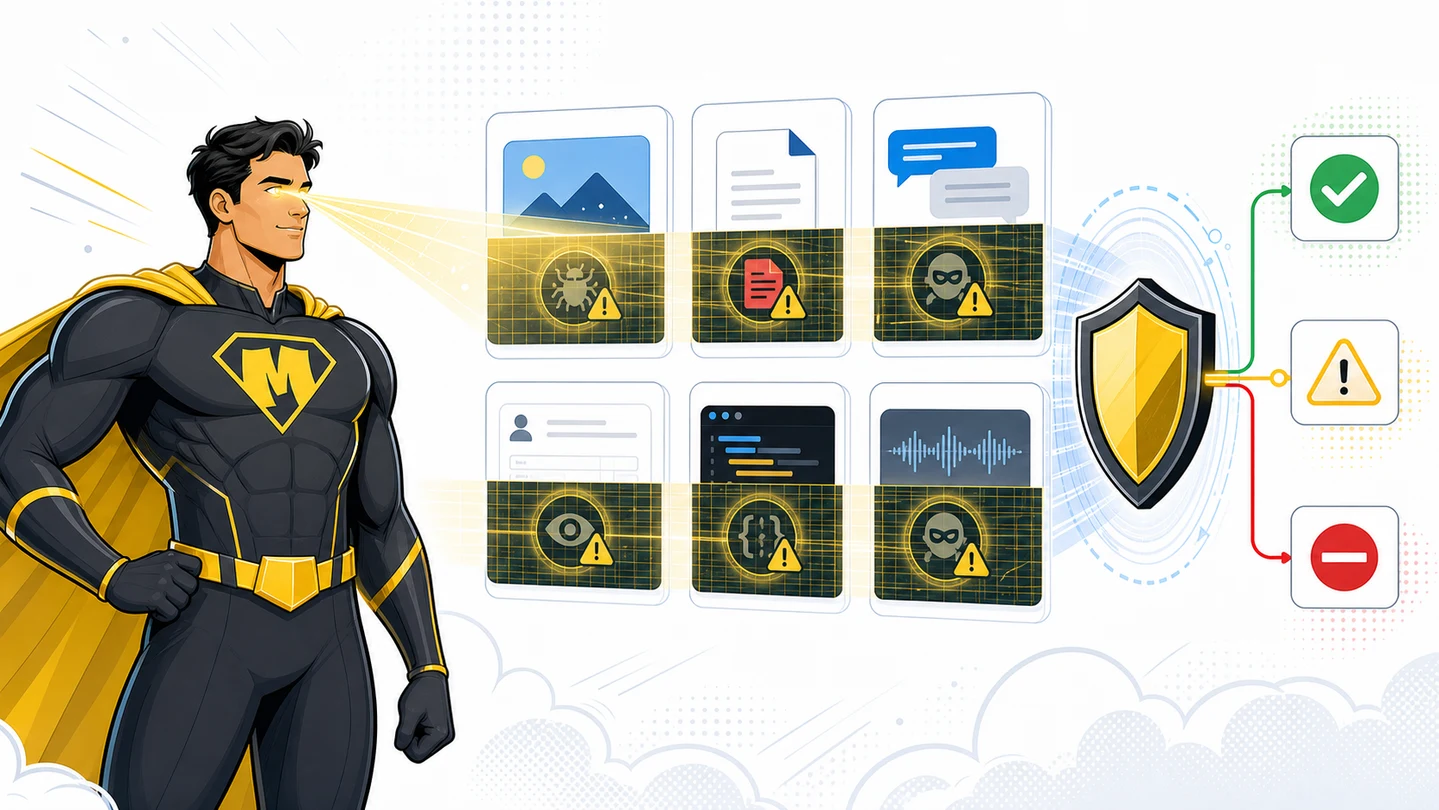
Citadel is multimodal because attackers do not stay in one format. A risky instruction can live in a chat message, PDF layer, screenshot, image metadata, OCR output, model answer, or uploaded document.
One scan contract, different inputs.
What Multimodal Detection Means
Multimodal detection means Citadel inspects the material your product is about to trust, then returns a routing action and evidence signals.
It does not mean Citadel decides what is true. It means each scan creates a security and safety checkpoint before your app stores, extracts, summarizes, routes, or acts on the material.
| Modality | What Citadel looks at | Common attacks |
|---|---|---|
| Text | User text, support notes, form fields, chat prompts, tool output, OCR text, extracted fields, model output. | Prompt injection, unsafe instruction, secret exposure, PII leakage, policy bypass, poisoned tool output. |
| Images | Damage photos, IDs, receipts, screenshots, visual evidence, image metadata when available. | AI-generated evidence signals, edited or inconsistent images, screenshot reposts, metadata mismatch, hidden or embedded instructions after OCR, steganography-style hidden payload attempts. |
| PDFs | Page text, extracted text, document structure, embedded images, per-page signals. | Hidden instructions, altered invoices, synthetic estimates, embedded image manipulation, poisoned extraction output. |
| Documents | Office documents, claim packets, estimates, forms, invoices, statements. | Document instructions, macro-like social engineering content, suspicious edits, hidden text, unsafe extraction targets. |
| OCR and IDP output | Text produced by OCR, parsers, extractors, or IDP systems. | Poisoned OCR text, field manipulation, hidden approval instructions, extraction hallucination becoming trusted data. |
| Model and agent output | Generated answers, summaries, recommendations, tool output, agent plans. | Unsafe output, secret leakage, tool-result injection, untrusted retrieval content, risky autonomous action. |
| Audio | Closed beta. Transcripts, call evidence, voice notes, and audio-derived text. | Transcript injection, synthetic voice evidence signals, speaker or context mismatch, sensitive disclosure in transcript. |
Audio support is closed beta. Treat audio-derived text as text today unless your team has beta access.
Attack Families
Prompt And Instruction Injection
Attackers add instructions that target an AI system, OCR pipeline, agent, or reviewer.
Examples:
- A PDF contains hidden text that says to ignore policy and approve the claim.
- OCR output includes instructions that were not visible to the user.
- A tool result tells an agent to exfiltrate data or skip checks.
Use focus=steg for text, OCR output, mixed uploads, and structured documents. Use focus=all when known image/PDF evidence also needs authenticity review.
Data Exfiltration Attempts
Attackers try to make a model, agent, tool, or OCR pipeline reveal secrets or private data.
Examples:
- A tool result tells an agent to send credentials to an external URL.
- A prompt asks the assistant to reveal system messages, API keys, or private context.
- A document instruction asks OCR or AI extraction to copy private fields into a response.
Scan before model context and scan output before users or tools see it.
Steganography And Hidden Payload Risk
Attackers can hide instructions or payloads in images, PDFs, metadata, OCR layers, or embedded content.
Examples:
- An image contains hidden text that appears after OCR.
- A PDF has an invisible instruction layer.
- A document contains embedded images that carry instructions.
Citadel helps detect and route these risks when signals are found. Route suspicious or indeterminate results to review.
AI-Generated Or Altered Evidence
Attackers submit evidence that may be generated, edited, reposted, or inconsistent with the workflow context.
Examples:
- A damage photo has suspicious authenticity signals.
- A receipt photo has missing or inconsistent metadata.
- An invoice appears altered before payment review.
Use content_type=image, pdf, document, or auto. Treat authenticity and forensic signals as review evidence, not proof.
Hidden Document Risk
Documents can carry risk outside the visible page.
Examples:
- Hidden text in a PDF.
- Embedded images that do not match the visible document.
- Suspicious instructions that only appear after extraction.
- Line items that differ between visual evidence and extracted fields.
Scan original files before OCR when possible. Then scan extracted text with the same scan_group_id.
Sensitive Data Exposure
Some workflows expect PII. Others must block it.
Examples:
- A claim upload contains normal names, addresses, and policy IDs.
- A model output exposes a secret or credential.
- A chat response includes private customer data.
Use data_sensitivity=tolerant when normal business PII is expected. Use strict for public AI output, credentials, secrets, or regulated disclosure risk.
Output Trust Failures
Generated output can become trusted too quickly.
Examples:
- An AI summary repeats hidden document instructions.
- An agent plan uses poisoned tool output.
- A support assistant leaks sensitive data in the final response.
Use scan_phase=output and reuse the input scan's scan_group_id.
How To Route Signals
| Result | Meaning | Product route |
|---|---|---|
| ALLOW | No material risk was found in that scan. | Continue. |
| WARN | Evidence deserves review, friction, redaction, or more proof. | Queue review or continue with controls. |
| BLOCK | Risk is high enough to stop the workflow. | Stop, redact when available, or require manual handling. |
indeterminate | Evidence is weak, incomplete, or conflicting. | Review or request more evidence. |
Do not say Citadel proves fraud. Say Citadel flagged risk or suspicious evidence for review.
Example Metadata
{
  "metadata": {
    "workflow": "damage_photo_review",
    "ai_involved": "true",
    "submitted_as_ai_generated": "unknown",
    "case_id": "claim_18422"
  }
}
Metadata is your app's context. It is not a Citadel verdict.
Ready to scan real traffic?
Book a working session on your files. Starting October 1, 2026, new commercial terms are enterprise or custom.
AI-Agent Prompt
Paste this into Cursor, Codex, Claude Code, or Windsurf.
Map this product's untrusted surfaces before adding Citadel.

For each surface, identify:
- modality: text, image, pdf, document, OCR output, model output, agent output, or audio transcript
- phase: input or output
- attack family: prompt injection, altered evidence, hidden document risk, sensitive data exposure, output trust failure
- config: content_type, scan_phase, focus, profile, data_sensitivity
- routing: ALLOW, WARN, BLOCK, indeterminate
- IDs to store: scan_id, request_id, scan_group_id, session_id

Rules:
- Use focus=steg for mixed file intake and structured documents. Use focus=all when known image/PDF evidence needs authenticity signals in addition to threat scanning.
- Scan original files before OCR when possible.
- Scan OCR text and model output with the same scan_group_id as the original file or prompt.
- Use data_sensitivity=tolerant for expected business PII.
- Use data_sensitivity=strict for public model output, secrets, or credentials.
- Treat audio as closed beta unless beta access exists. Otherwise scan audio transcripts as text.
- Do not claim Citadel proves fraud.

Acceptance criteria:
- Every modality has a server-side scan before trust.
- Every attack family has a route.
- Review wording says flagged for review, not fraud confirmed.